
MX PLAYER
SCREENSHOTS
MX Player APK Download v2.13.2 Latest Version for Android
In the world of mobile entertainment, MX Player has long been the gold standard for video playback. As we move through 2026, it has transitioned from a simple media player into a comprehensive entertainment hub that combines powerful local playback with massive streaming capabilities. The latest version, v2.13.2, continues this legacy by offering unmatched support for various video formats, advanced hardware acceleration, and an integrated content library. This article provides an extensive look at the technical details, core features, and the installation process for the May 2026 update.
The Evolution of MX Player in 2026
The focus of the v2.13.2 update is efficiency and versatility. In an era where users consume content from both local storage and cloud services, MX Player acts as the bridge. This version is built on a highly optimized core that reduces CPU usage during playback, which is a major benefit for battery life on long journeys. The user interface has also been modernized to feel more intuitive on the latest Android 15 and 16 devices, featuring smoother transitions and better support for foldable screens.
Core Features of the v2.13.2 Update
The developers have introduced and refined several key features that keep MX Player at the top of the "Video Players & Editors" category.
Advanced Hardware Acceleration
MX Player was the first Android video player to support multi-core decoding. In version 2.13.2, this technology has been further enhanced with the HW+ decoder. This allows the app to utilize the full power of your smartphone's graphics processor (GPU) to play demanding video files smoothly while keeping the device cool.
Subtitle Gestures and Customization
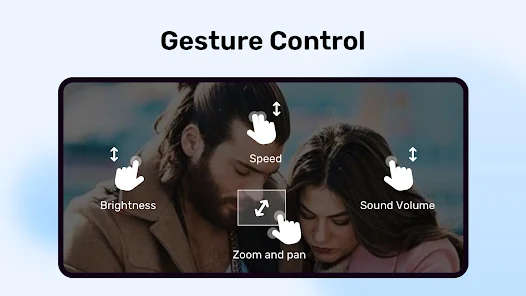
One of the most loved features of MX Player is its subtitle support. You can easily scroll forward or backward to move to the next or previous text, zoom in or out to change text size, and even change the position of the subtitles on the screen. The latest build adds support for more exotic subtitle formats and improved synchronization controls.
Kids Lock and Privacy Features
For parents, the "Kids Lock" feature is invaluable. It allows children to watch videos without the risk of them making calls or touching other apps. Additionally, the "Private Folder" feature in v2.13.2 ensures that your personal videos remain hidden and protected by a PIN or biometric lock, keeping them separate from the main library.
Integrated File Sharing (MX Share)
MX Player includes its own file-sharing feature that allows users to send and receive videos, music, and files without using mobile data. This peer-to-peer sharing is incredibly fast and is integrated directly into the player interface, making it easy to share a movie with a friend nearby in seconds.
Technical Performance and Optimization
The file size of 104.7 MB is quite lean for an app that packs so many codecs and features. This is achieved through a modular architecture where the app only loads the components it needs for a specific file type.
Low Latency Audio Sync
A common issue in mobile video players is the lag between audio and video, especially when using Bluetooth headphones. Version 2.13.2 includes a specific "Audio Delay" adjustment tool that allows you to manually sync audio in milliseconds, ensuring a perfect cinematic experience every time.
Support for All Major Formats
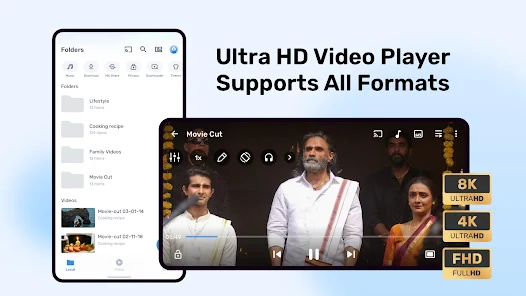
Whether it is MKV, MP4, AVI, MOV, or specialized formats like FLV and WMV, MX Player handles them all natively. The v2.13.2 update specifically improves the rendering of HDR10+ and Dolby Vision content on supported mobile displays, providing deeper blacks and more vibrant colors.
Security and Verification
In the current digital landscape, app security is a non-negotiable requirement. The MX Player v2.13.2 APK has undergone rigorous security testing. The scan results show a 0/56 detection rate, meaning none of the leading security engines found any traces of viruses, spyware, or malware. This verification confirms that the file is safe to install on your primary device without risking your personal information.
Professional Installation Guide for MX Player APK
To successfully install or update to version 2.13.2, follow these structured steps.
- Check Compatibility: Ensure your device is running Android 7.0 or higher.
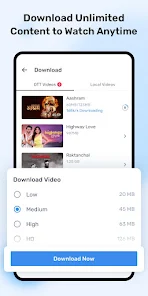
- Download the File: Download the 104.7 MB APK file from a trusted source. Ensure the download completes fully to avoid package corruption.
- Enable Unknown Sources: Navigate to Settings > Security (or Privacy) and enable the option to "Install from Unknown Sources." This is a necessary step for installing any APK file manually.
- Locate and Install: Open your file manager, find the MX Player v2.13.2 APK, and tap on it. Follow the installation prompts.
- Grant Permissions: Upon the first launch, the app will ask for permission to access your media files. This is required for the app to build your video library.
Frequently Asked Questions
Is MX Player v2.13.2 free to use? Yes, the version mentioned here is the ad-supported free version. It provides all the powerful playback features without any subscription fee.
Can I play 4K videos on MX Player? Absolutely. If your device hardware supports 4K rendering, MX Player v2.13.2 will use hardware acceleration to play 4K and even 8K files with ease.
What is the difference between HW and HW+ decoders? HW uses the standard system decoder provided by the Android OS, while HW+ is MX Player’s proprietary decoder that often provides better performance and compatibility for specific high-resolution files.
How do I use the Private Folder? Go to the "Local" tab, select the videos you want to hide, and choose the "Move to Private Folder" option. You will be prompted to set up a secure lock.
Final Thoughts on the v2.13.2 Update
MX Player v2.13.2 remains the most versatile and reliable video player for the Android platform in 2026. By focusing on core performance, wide format compatibility, and user privacy, it continues to be a must-have application for any media enthusiast. The integration of advanced sharing tools and a secure private folder makes it more than just a player; it is a complete media management system. Ensure you update to the latest version to enjoy the latest performance optimizations and security patches.